How to give a subject in a portrait a golden hue to their skin.
I got this alot when friends come to me and ask me to photo enhance their picture so it will look nice for them to show off to their friends in facebook etc.. So this is how we do it
1. Open up a portrait. It doesn't have to be anything fancy, just a picture of a person.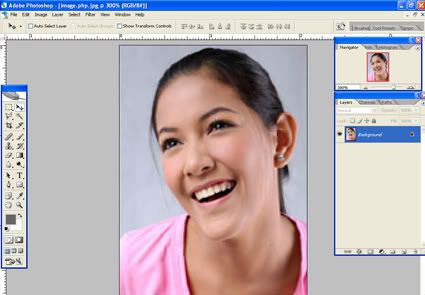
2. Go to your layers palette and create a new adjustment layer. We can do this simply by clicking the button at the bottom of the layers palette that looks like a half black half white circle.

3. A new pop up menu will appear. Select the “photo filter” option from the menu.
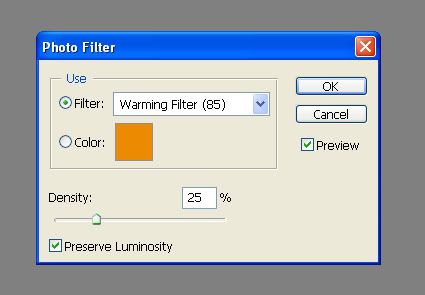
5. - Alternate methods (skip this if you have the photo filter adjustment layer):
If you are using a raw image simply adjust the white balance to slightly warmer. If you aren't using a raw, you can achieve a similar effect with the color balance adjustment tool which is found in the menu Image>Adjustments> Color Balance. To warm the image with the color balance tool just slide the sliders toward red and yellow just a bit.
6. Duplicate your original image layer. We can do this by dragging the layer in the layers palette to the sticky note button at the bottom of the layers palette. Drag the new duplicated layer above your adjustment layer in the layers palette so it is the top most layer.
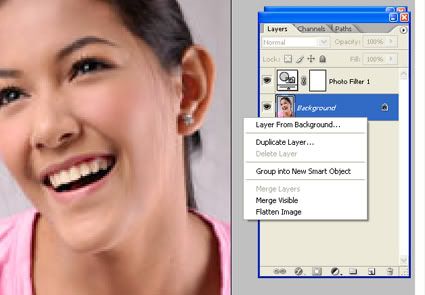
8. Decrease the opacity of the duplicate layer with opacity slider (which is also at the top of the layers palette) until you get the effect to like.
9.You can take this a step further by adding a layer mask to mask out this effect in prats of your image that you don’t want the effect applied to
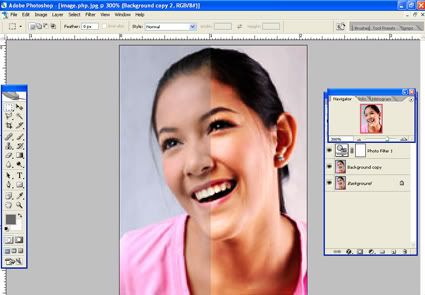
see the difference? very simple & easy, kau pun bule bikin bah
I want to have a download section for all my tutorial, that i think it might benefits newbies into designing. But that had to wait, i need to find a proper hosting for that. Stay Tuned


0 comments:
Post a Comment